My Cart: 0 item(s)

Esentia Systems Blog
Security Camera Cable Guide: Choosing the Right Wire
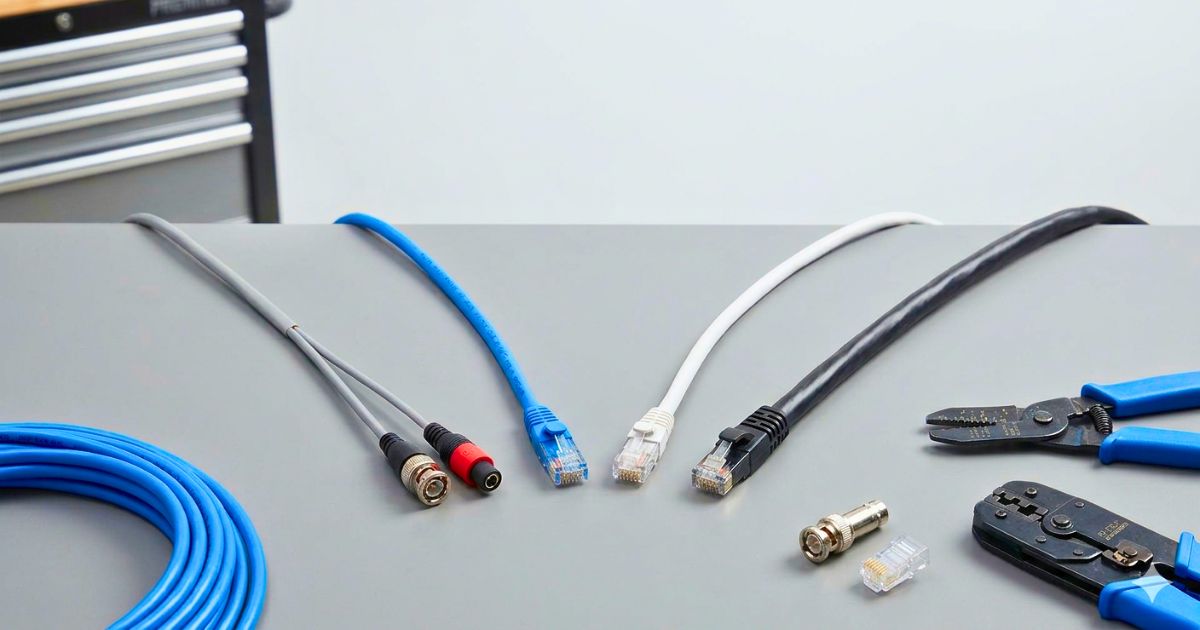
CCTV Camera Cables: Coax, Ethernet, PoE & Fire Ratings
Learn how to choose the right security camera cable for IP, PoE, analog, indoor, outdoor, plenum, and long-distance surveillance installations.
by Brandon Scott • May 13, 2026
Choosing the right security camera cable is one of the most important decisions you can make when planning a surveillance system. Cameras, recorders, and monitors often get the most attention, but cabling is what keeps the entire system connected, powered, and reliable.
A high-resolution camera can only perform as well as the wire carrying its video signal, network data, and power. The wrong cable can lead to blurry images, dropped video, camera reboots, weak night vision, or complete signal loss.
This guide explains the most common security camera cable types, when to use them, and what to look for when choosing wire for residential, commercial, indoor, outdoor, and long-distance installations.
Why Security Camera Cabling Matters
Security cameras depend on stable connections. Whether you are installing a simple home surveillance system or a large commercial security network, the cable you choose affects three major things.
- Video Quality: Poor cable can cause signal loss, interference, lag, or reduced image clarity.
- Power Delivery: Thin or low-quality wire can cause voltage drop, especially on longer runs.
- System Reliability: Properly rated cable reduces failures, safety risks, and future maintenance issues.
Low-Voltage Fundamentals
Most security camera systems use low-voltage power, such as 12V DC, 24V AC, or PoE, which stands for Power over Ethernet.
Low-voltage wiring is safer and more flexible than standard electrical wiring, but cable quality still matters. Conductor material, wire gauge, jacket rating, distance, and installation environment all affect performance.
Solid Copper vs. Copper Clad Aluminum
For professional security camera installations, solid copper cable is strongly preferred over CCA, or copper-clad aluminum.
CCA cable has higher resistance, can be more brittle, and may cause voltage drop or heat issues, especially with PoE cameras. This can lead to unstable camera operation, weak night vision, or intermittent signal loss.
For dependable surveillance wiring, especially on long runs or PoE systems, solid copper is the better choice.
Wire Gauge and Voltage Drop
Wire gauge is measured in AWG, or American Wire Gauge. A lower AWG number means a thicker wire.
Thicker wire carries power more efficiently over longer distances. If the wire is too thin or the run is too long, voltage drop can occur. Common signs include camera rebooting, flickering video, weak night vision, or cameras working during the day but failing at night.
Primary Cable Types for Security Camera Systems
The right cable depends on whether you are installing an analog system, an HD-over-coax system, or an IP camera system.
1. Coaxial Cable for Analog and HD-over-Coax Cameras
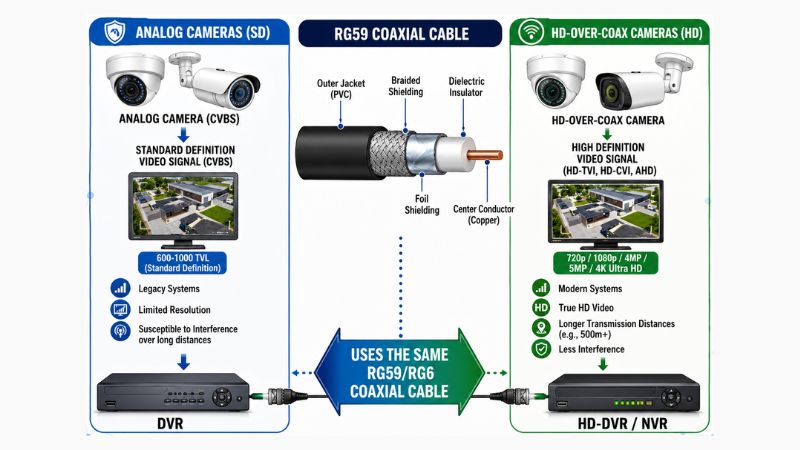
Coaxial cable is commonly used for analog security cameras and HD-over-coax formats such as HD-TVI, HD-CVI, and AHD.
RG59 Siamese Cable
RG59 Siamese cable is the standard choice for many analog camera installations. It combines:
- Coaxial cable for video
- Power wire for a low-voltage camera power
This allows installers to run video and power together from the camera back to the recorder or power supply.
RG6 Cable
RG6 is thicker than RG59 and may be used for longer distances or higher-frequency requirements. However, it is less flexible and can be harder to terminate in tight spaces. For most standard analog surveillance systems, RG59 Siamese cable is typically preferred.
BNC Connectors and Power Leads
Analog and HD-over-coax cameras usually use BNC connectors for video and DC pigtails or terminals for power. Secure, properly installed connectors help prevent flickering, signal loss, and intermittent camera issues.
2. Ethernet Cable for IP Cameras and PoE Systems
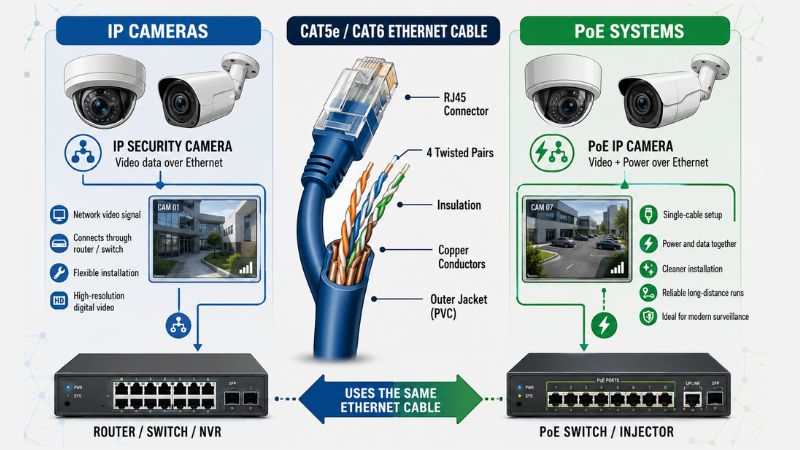
IP security cameras use an Ethernet cable to transmit video data. In PoE systems, the same cable also delivers power.
Cat5e Cable
Cat5e is a reliable baseline for many IP camera systems. It supports up to 1Gbps under standard conditions and works well for many residential and commercial installations.
Cat6 Cable
Cat6 offers better performance and interference protection than Cat5e. It is a strong choice for modern IP camera systems, especially when planning for higher camera counts or future upgrades.
Cat6a Cable
Cat6a provides greater bandwidth and improved interference protection. It is often used for high-density commercial camera systems or high-bandwidth 4K and 8K video applications.
Power over Ethernet
PoE allows IP cameras to receive power and data through a single RJ45 cable. This simplifies installation, reduces cable clutter, and makes system management easier.
For PoE camera systems, a solid copper Ethernet cable is strongly recommended.
3. Cable Ratings and Jacket Types
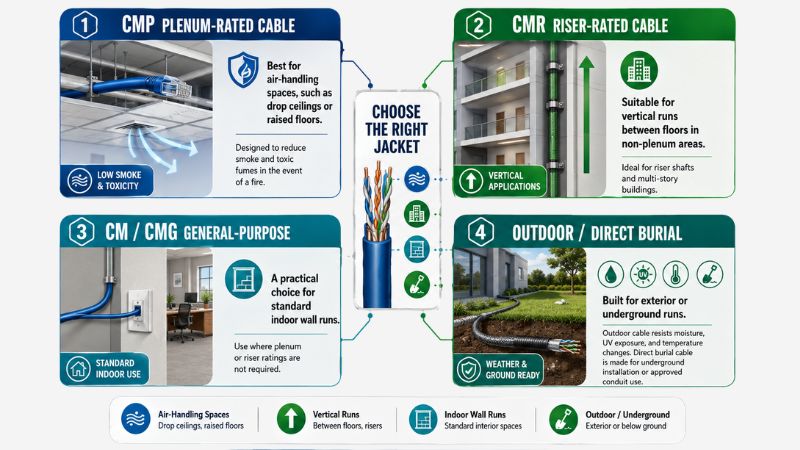
Cable jackets are rated for different environments. Choosing the correct rating helps support safety, code compliance, and long-term reliability.
- CMP Plenum-Rated Cable: Best for air-handling spaces, such as drop ceilings or raised floors. It is designed to reduce smoke and toxic fumes in the event of a fire.
- CMR Riser-Rated Cable: Suitable for vertical runs between floors in non-plenum areas, especially in multi-story buildings.
- CM / CMG General-Purpose Cable: A practical choice for standard indoor wall runs where plenum or riser ratings are not required.
- Outdoor / Direct Burial Cable: Built for exterior or underground runs. Outdoor cable resists moisture, UV exposure, and temperature changes, while direct burial cable is made for underground installation or approved conduit use.
Standard indoor cable should not be used outdoors without proper protection.
Distance Limitations and Signal Integrity
Even high-quality cable has distance limits. Exceeding them can cause poor image quality, data loss, voltage drop, or camera instability.
The 328-Foot Ethernet Rule
Ethernet cable runs for IP cameras should generally stay within 328 feet, or 100 meters.
For longer distances, you may need a PoE extender, network switch, fiber optic cable, wireless bridge, or local power source.
Voltage Drop on Long Runs
Voltage drop occurs when power weakens as it travels through the cable. It is especially important for 12V DC and 24V AC cameras.
If the voltage reaching the camera is too low, the camera may reboot, lose night vision, flicker, or disconnect.
Interference and Cable Routing
Security camera cable should be routed away from high-voltage electrical wiring whenever possible.
Best Practices
- Keep low-voltage cable separated from electrical lines.
- Cross electrical lines at a 90-degree angle when needed.
- Avoid motors, transformers, fluorescent ballasts, and heavy machinery.
- Use shielded cable in high-interference environments.
- Avoid sharp bends, crushed cable, and excessive pulling force.
Quick-Reference Security Camera Cable Selection Guide
| If you are installing... | Use this cable type | Standard connector |
|---|---|---|
| IP or PoE cameras | Cat5e or Cat6 | RJ45 |
| High-bandwidth 4K or 8K IP cameras | Cat6a | RJ45 |
| Analog or HD-over-coax cameras | RG59 Siamese | BNC |
| Outdoor camera runs | Outdoor-rated cable | Varies |
| Underground camera runs | Direct burial-rated cable | Varies |
| Plenum ceilings | CMP plenum-rated cable | Varies |
| Vertical runs between floors | CMR riser-rated cable | Varies |
Common Security Camera Cable Mistakes to Avoid
- Using CCA Cable for PoE Cameras: CCA cable may be cheaper, but it is not ideal for PoE. Solid copper cable offers better conductivity, durability, and power delivery.
- Ignoring Jacket Ratings: Indoor cable should not be used outdoors without protection, and general-purpose cable should not be used in plenum spaces if CMP-rated cable is required.
- Exceeding Distance Limits: Ethernet cable should generally stay within 328 feet. Power and analog runs also have practical distance limits based on cable type, signal, and voltage drop.
- Running Cable Too Close to Electrical Wiring: Low-voltage cable installed too close to high-voltage wiring can experience interference and reduced reliability.
- Using Poor-Quality Connectors: Loose BNC connectors, weak RJ45 terminations, or poor DC power connections can cause intermittent issues that are difficult to troubleshoot.
Choosing the Best Cable for Your Security Camera System
For analog or HD-over-coax cameras, RG59 Siamese cable is often the standard choice.
For IP and PoE cameras, Cat5e or Cat6 is commonly used, while Cat6a is a strong option for higher-bandwidth or future-ready installations.
For plenum spaces, use CMP-rated cable. For vertical runs between floors, use CMR-rated cable. For outdoor or underground installations, choose cable specifically rated for moisture, UV exposure, or direct burial.
When in doubt, choose solid copper cable, match the jacket rating to the environment, and stay within proper distance limits.
Conclusion
Selecting the right security camera cable can prevent many common surveillance problems, including signal loss, camera reboots, weak night vision, interference, and costly service calls.
By understanding coaxial cable, Ethernet cable, PoE, jacket ratings, and distance limitations, you can build a cleaner, safer, and more dependable camera system.
Ready to Build Your System?
Now that you know which cable you need, browse the full selection of professional-grade bulk wire, connectors, and installation tools at Esentia Systems. Whether you are wiring a single home, a retail space, a warehouse, or a large commercial complex, Esentia Systems has the stock to help get your project moving.
FAQs
What cable is best for security cameras?
The best cable depends on the type of security camera system. IP and PoE cameras usually use Cat5e, Cat6, or Cat6a Ethernet cable, while analog and HD-over-coax cameras typically use RG59 Siamese cable. For professional installations, solid copper cable is recommended.
Is Cat5e enough for PoE cameras?
Cat5e is enough for many standard IP and PoE camera systems. It supports up to 1Gbps under standard conditions and works well for many residential and commercial camera installations. For higher-bandwidth systems or future-ready installs, Cat6 or Cat6a may be a better choice.
What is the maximum cable distance for IP security cameras?
The standard maximum distance for Ethernet cable is 328 feet, or 100 meters. If an IP camera needs to be installed farther away, you may need a PoE extender, network switch, fiber optic cable, wireless bridge, or local power source.
Do outdoor security cameras need special cable?
Yes. Outdoor security cameras should use a cable rated for outdoor conditions. Outdoor-rated cable is designed to resist moisture, sunlight, temperature changes, and jacket damage. For underground runs, use direct burial-rated cable or approved conduit.
Can a security camera cable run next to an electrical wire?
Security camera cable should not run directly alongside high-voltage electrical wire for long distances. Keep low-voltage camera cable separated from electrical wiring when possible, and cross electrical lines at a 90-degree angle if needed.
overall rating:
my rating:
log in to rate